
Download Overdub – High‑Quality TTS Voice Generator, AI Voice Cloning, Podcast Tool
Overview
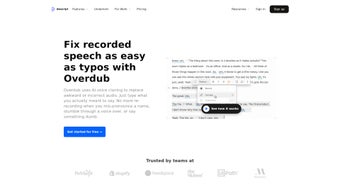
Descript’s Overdub is a breakthrough text‑to‑speech (TTS) engine that lets you create a natural‑sounding digital replica of your own voice or pick from a curated library of stock human voices. Powered by Lyrebird AI, Overdub delivers ultra‑realistic voice synthesis that can be used for podcast editing, screen‑recording narration, video subtitles, and any situation where you need a reliable, high‑quality voice without the hassle of re‑recording. The tool is bundled with every Descript account at no extra cost, while Pro users unlock unlimited vocabulary, multiple voice slots, and advanced privacy controls.
Overdub integrates directly into Descript’s collaborative audio/video editor, which already includes automatic transcription, filler‑word removal, and AI‑driven subtitle generation. This seamless workflow means you can type a missed line, hit “Enter,” and instantly hear it spoken in your own voice—saving hours of studio time and reducing the need for costly voice‑over talent. Whether you’re a solo podcaster, an e‑learning creator, or a marketing team looking for rapid voice‑over production, Overdub provides a secure, scalable solution that keeps your brand’s tonal consistency while remaining easy enough for beginners to adopt.
Key Features
- Voice Cloning with Lyrebird AI: Generate a digital twin of your voice that captures tone, cadence, and subtle inflections.
- Stock Human Voices: Choose from a library of professionally recorded voices for projects that require a different accent or gender.
- Unlimited Vocabulary (Pro): Remove character limits on generated text, allowing full‑script creation without truncation.
- Multiple Voice Slots: Create and manage several distinct Overdub voices for teams or multilingual content.
- Real‑Time Text Editing: Type missing words or entire paragraphs directly into the editor and hear them spoken instantly.
- Privacy‑First Architecture: Voice models are stored securely, and only you (or authorized collaborators) can generate audio with them.
- Seamless Descript Integration: Overdub works hand‑in‑hand with transcription, filler‑word removal, screen recording, and subtitle tools.
- Collaboration Controls: Assign voice‑generation rights to trusted teammates while keeping the original voice owner in control.
- Cross‑Platform Support: Available on Windows, macOS, iOS, Android, and via web browsers for maximum accessibility.
- Free Tier Access: Every Descript account gets a basic Overdub voice, making high‑quality TTS accessible without a subscription.
Installation, Usage & Compatibility
Getting started with Overdub is intentionally frictionless. Since Overdub lives inside the Descript ecosystem, you only need to install the Descript desktop app or access the web version. Follow these steps to begin:
- Create a Descript account: Sign up at descript.com using an email address or single‑sign‑on (Google, Apple, Microsoft).
- Download the app: For Windows, click the Download for Windows button; for macOS, select Download for Mac. The installer is a standard .exe or .dmg file that runs in under two minutes.
- Launch Descript and enable Overdub: In the app’s sidebar, navigate to Settings → Overdub. Follow the on‑screen voice‑recording wizard, which asks you to read a short script (≈ 30 seconds) to train the AI model.
- Verify your voice model: After processing (usually 5–10 minutes), you can preview the cloned voice by typing a test sentence and hitting Play.
- Start creating content: Open a new project, import your audio or video, and use the Overdub button to replace or insert spoken text.
Supported Operating Systems: Windows 10 or later, macOS 10.15 Catalina or later, iOS 13+, Android 8.0+, and any modern web browser (Chrome, Edge, Safari, Firefox).
The workflow is designed for both beginners and power users. Beginners benefit from the visual “type‑and‑listen” interface, while power users can script bulk Overdub generation via Descript’s API (available to Pro accounts). Because the voice model is stored in the cloud, updates to the AI engine are delivered automatically—no manual patching is required. Overdub also respects local privacy regulations; you can delete a voice model at any time from the Settings panel, ensuring complete control over your personal data.
Pros & Cons
Pros
- Ultra‑realistic voice cloning that sounds indistinguishable from the original speaker.
- Free tier provides a functional Overdub voice without a subscription.
- Unlimited vocabulary for Pro users removes script length constraints.
- Deep integration with Descript’s editing suite speeds up post‑production.
- Multiple voice slots enable team collaboration and multilingual projects.
- Privacy‑first design gives users full control over voice data.
- Cross‑platform availability ensures you can work on any device.
Cons
- Initial voice‑training requires a quiet environment and a decent microphone.
- Pro features (unlimited vocabulary, multiple voices) are locked behind a subscription.
- Complex projects with many voice changes can increase rendering time.
- Audio quality depends on the quality of the source script—poorly written text can sound robotic.
- Limited customization of voice emotion (e.g., excitement, sarcasm) compared to dedicated voice‑acting services.
Overdub stands out as one of the most accessible and high‑quality TTS solutions on the market. The combination of AI‑driven voice cloning and seamless integration with Descript’s editing tools makes it a powerhouse for podcasters and video creators alike. While the free tier is generous, the real value shines for Pro users who need unlimited vocabulary and multiple voice slots. The only drawback is the learning curve for perfect voice training, but the payoff in time saved during post‑production is undeniable.
FAQ & Conclusion
How long does it take to create an Overdub voice?
The recording step takes about 30 seconds, and the AI processing usually finishes within 5‑10 minutes, after which you can start generating speech.
Can I use Overdub for commercial projects?
Yes. Overdub’s licensing allows commercial use, but you must adhere to Descript’s terms of service and ensure you have the rights to any content you generate.
Is my voice data stored securely?
Descript employs encryption at rest and in transit. Voice models are stored on secure servers, and you can delete them at any time from the Settings panel.
Do I need a powerful computer to run Overdub?
No. Because the heavy AI processing occurs in the cloud, a modest modern computer or even a smartphone with a stable internet connection is sufficient.
What’s the difference between the free and Pro versions?
Free users receive one Overdub voice with a limited character count per month. Pro users enjoy unlimited vocabulary, multiple voice slots, priority support, and advanced privacy controls.
Conclusion
If you’re looking for a reliable, high‑quality text‑to‑speech solution that blends seamlessly with a full‑featured audio editor, Overdub is a standout choice. Its AI‑driven voice cloning delivers natural results, while the free tier makes it easy to test without a financial commitment. For creators who need unlimited script length, multiple voice identities, or tighter privacy controls, the Pro subscription unlocks the full potential of the platform. Download Overdub today, try the free voice model, and experience how a few keystrokes can replace hours of re‑recording. Your podcast, tutorial, or marketing video will sound more polished, faster, and at a fraction of the traditional production cost.
Download Overdub now and start creating ultra‑realistic voice content instantly.



.png)



